How I learned about End-to-End encryption — the hard way
Recently, my friends and I joined a competition organized by the Leo Club in our area. The competition was to build a social media app for…

Recently, my friends and I joined a competition organized by the Leo Club in our area. The competition was to build a social media app for Leo Clubs.
The goal was simple: we had to implement features like posts, clubs, and events. Users should be able to follow other users, follow clubs, etc.
One cool feature we added to the app was a chat feature. Similar to apps like Facebook Messenger, users could search for any other user and send them a message. Everything went as planned, and we successfully demonstrated our app to the judges.
However, during the interview, a judge pointed out that our app had one major flaw. We had implemented our messaging feature as a fully cloud-based platform (which, in my opinion, is actually a good thing). The real issue was how we handled messages.
We stored them in our database as plain text!
It took me a while to realize how terrible this was. People using the app probably wouldn’t know the risk they were taking by sending confidential information in messages, not realizing that those messages weren’t private at all.
So, I said screw it — I’m going to add end-to-end encryption to this app!
The Solution
At this point, I knew the best way to fix the privacy issue was to use end-to-end encryption. But I didn’t know exactly how.
I thought about it for a while, and the first thing that came to mind was RSA — a method where we use a private key and a public key to encrypt messages. If someone wants to send me an encrypted message, I simply give them my public key (this transfer doesn’t need to be super secure, because a public key getting leaked isn’t the end of the world). Then, whoever wants to send me a message can encrypt it using my public key and send it over. The only way to decrypt it is with my private key.
The solution seemed simple (or so I thought). All I had to do was add another column to our users table called public_key , where we could store each user’s public key. The key pair would be generated on the device, the public key sent to the server upon registration, and the device would hold onto the private key.
Problem
So, after creating that master plan, I sat at my desk and started implementing the end-to-end encryption. It took me a while to get everything working properly.
Once I was confident about my implementation, I wanted to do a quick test.
I grabbed my phone and my tablet, installed the app on both, and logged in using two different accounts.
I sent the first message, and it appeared on the other device. (Honestly, I was a bit surprised it worked on the first try.) I was still skeptical about whether the app was actually sending the message encrypted.
I quickly logged into the server and peeked at the database. Luckily, the messages there were encrypted.
At this point, I was really happy and about to call it a day. Then I decided to give it another test (just to make sure).
I closed the apps and opened them again.
The Surprise
Well, I was a bit surprised by what I saw, but at the same time, I felt stupid for not thinking it through properly.
In the chat screen, I could only see the messages sent by the other person. All the messages I had sent myself were tagged with “Couldn’t decrypt the message.”
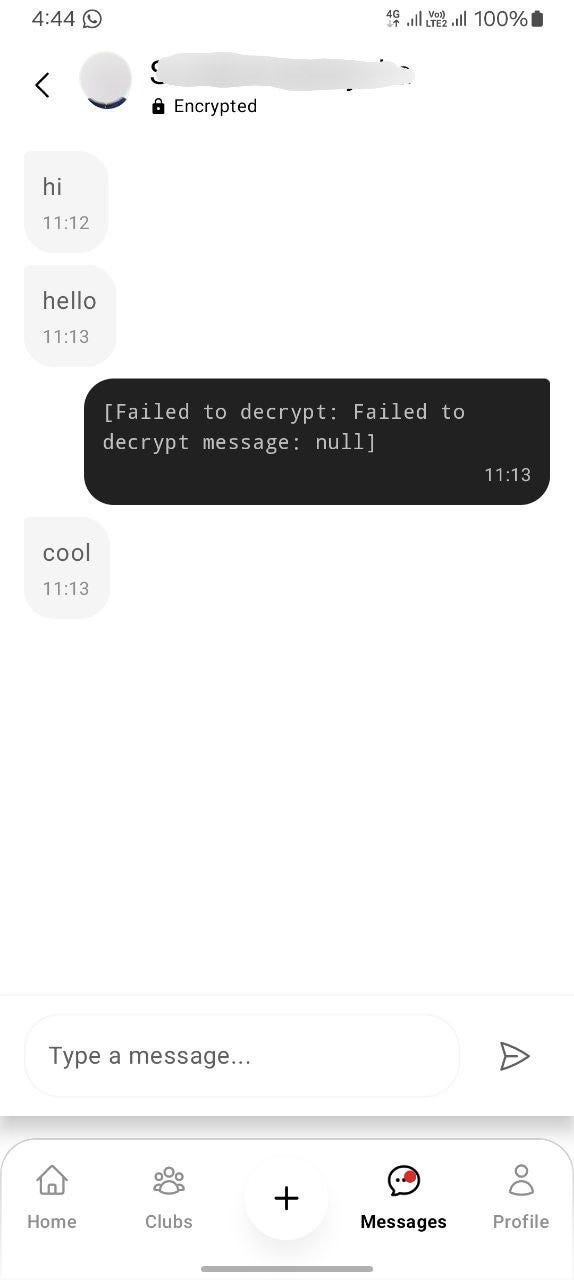
The issue was clear. As I mentioned earlier, messages I sent were encrypted using the recipient’s public key, and only their private key could decrypt them. That meant even I couldn’t decrypt the messages I’d sent myself.
What’s the Solution?
Honestly, I don’t have a clear plan for what to do next. I have a few ideas but haven’t decided which to try:
- Create some sort of local database in the app to store decrypted conversations, along with the sent messages.
- Add another column in the messages table to store the same message encrypted using my own public key (so I can decrypt it with my private key).
- Create key pairs for conversations instead of for users. We’d need to securely share the same symmetric key between the two parties, and use it to encrypt all messages in the conversation.
- Use some sort of symmetric encryption algorithm and share the keys securely.
Each solution comes with its own unique challenges. By the time you’re reading this, I might have implemented one of the above — or maybe a completely different solution (you may never know).
The Other Problem
I already mentioned that our app is cross-platform, which means users should be able to sign into the same account on different devices and use it without barriers.
Unfortunately, our E2EE messaging implementation gets in the way. The private keys are stored on the device, so when a user switches to a new device, it generates its own new key pair (according to the current setup).
This caused a problem: newly logged-in devices were overwriting the old device’s public key on the server.
And that wasn’t the only issue — the messages encrypted with the old device’s public key were no longer readable on the new device.
What’s the Solution for That?
For the overwriting problem, I came up with a quick and dirty fix: instead of overwriting, the app now prompts the user to choose what they want to do.
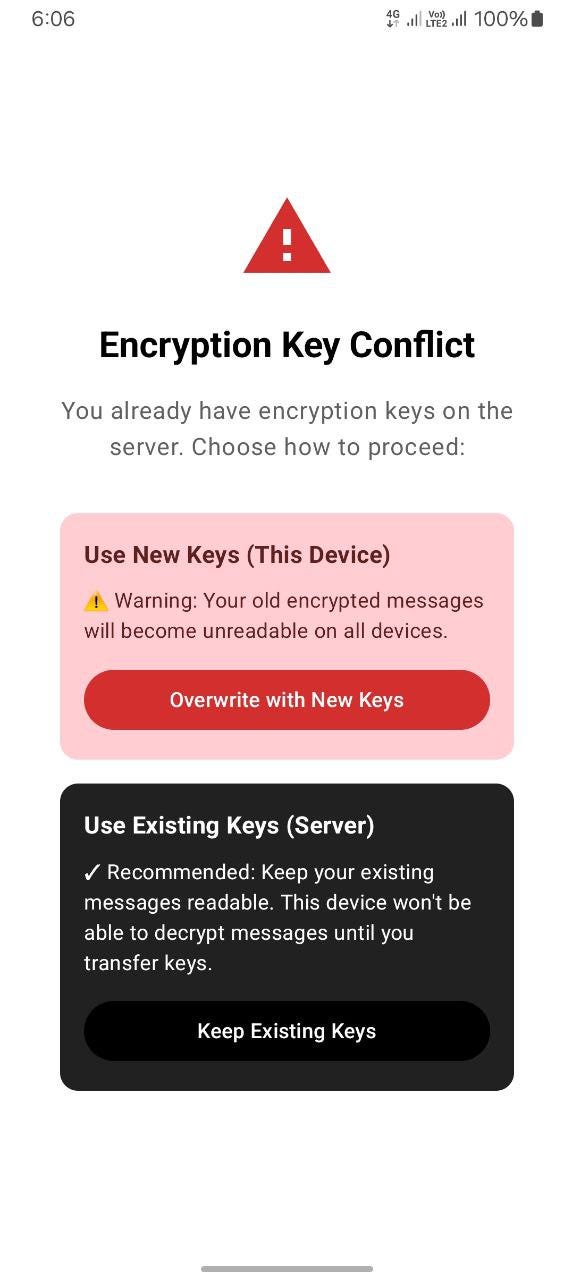
I know — that’s the worst UX ever, and I still regret it.
Anyway, to properly fix this account transfer issue, I have some ideas:
- Make the user scan a QR code on the old device from the new one, essentially copying the private key over.
- Create a server-side feature that syncs private keys between devices (yeah, this sounds like a privacy violation, but I guess users might prefer it over the QR code hassle).
As always, I still haven’t decided which to use. Hopefully, I’ll come up with an even better solution than these two.
What I Learned
I learned that end-to-end encryption is hard. Now I get why apps like Telegram completely skip it for convenience, and why WhatsApp struggles so much with cross-device support.